Branded course and session tiles
The problem
The booking form is often the first part of your site that looks "different". Parents notice when the fonts, colours and card style change halfway through booking. You want the form to look like the rest of the site while Zooza keeps handling capacity, pricing, trials and payment.
How it looks
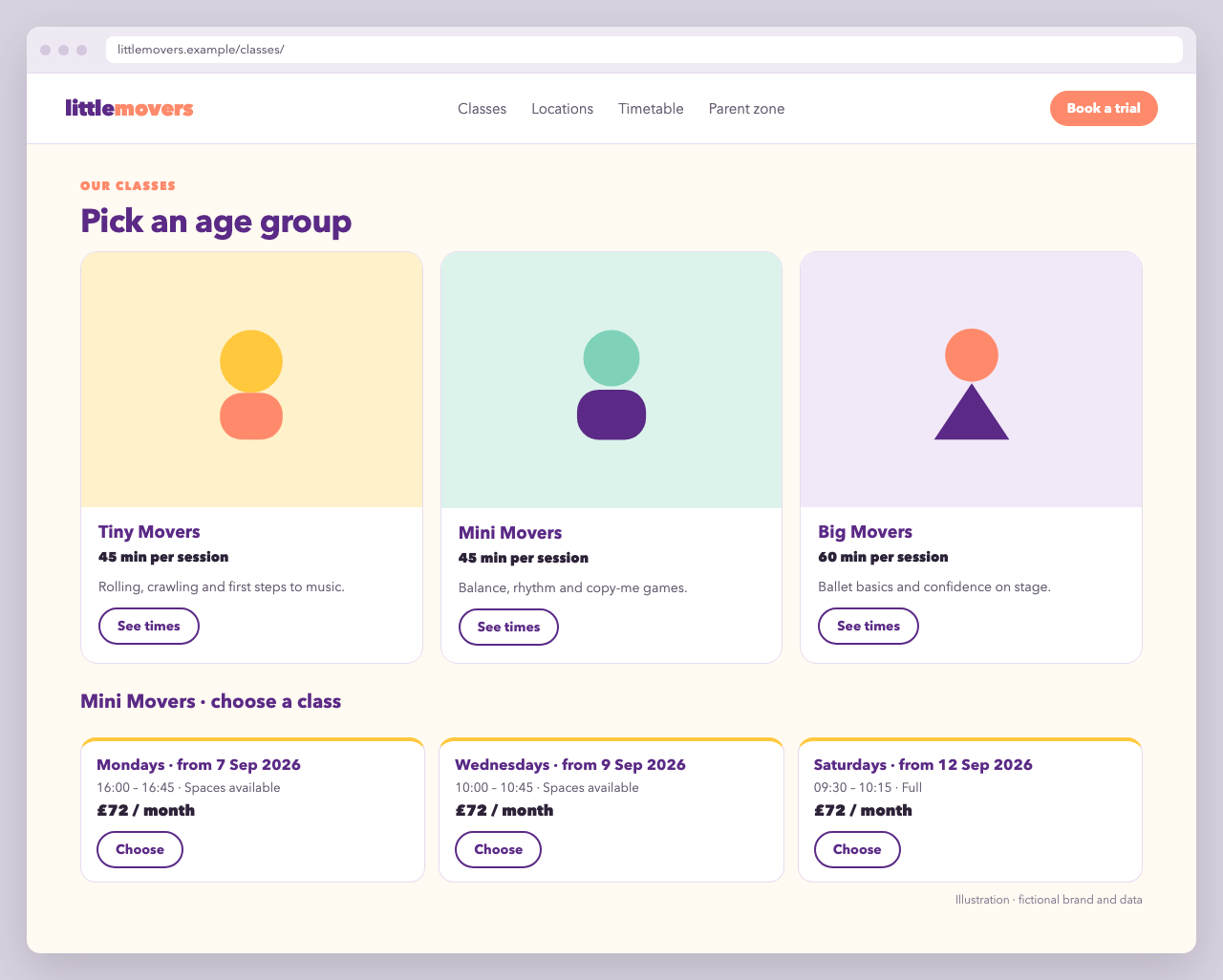
Two levels of customisation
| Level | Effort | You control |
|---|---|---|
| 1. CSS on top of the default tiles | Minutes | Colours, fonts, borders, spacing, grid |
| 2. Your own tile templates | An hour | Everything inside each tile: images, copy, badges, buttons |
Both levels keep the widget's own logic: the tile wrapper, selection, collapse and the rest of the booking flow.
Level 1: CSS only
Little Movers uses a plum and sunshine-yellow palette with rounded cards. Scope your rules to your own placeholder so they never leak into the rest of the page:
<div class="lm-booking"
     data-zooza-widget="registration"
     data-zooza-id="YOUR_API_KEY"
     data-zooza-course-list-display="grid"
     data-zooza-course-list-columns="2"></div>
<script async src="https://api.zooza.app/widgets/v1/loader.js"></script>
.lm-booking {
  --lm-plum: #5b2a86;
  --lm-plum-dark: #431f63;
  --lm-sun: #ffc83d;
  --lm-line: #e6dcef;
  --lm-radius: 18px;
  font-family: "Nunito", system-ui, sans-serif;
  color: #2d2338;
}

/* Programme (age group) tiles */
.lm-booking .zooza_courses_course {
  border: 1.5px solid var(--lm-line);
  border-radius: var(--lm-radius);
  padding: 1.25rem;
  background: #fff;
  transition: border-color .15s, box-shadow .15s;
}
.lm-booking .zooza_courses_course:hover {
  border-color: var(--lm-plum);
  box-shadow: 0 6px 18px rgba(91, 42, 134, .12);
}
.lm-booking .zooza_courses_course.selected {
  border-color: var(--lm-plum);
  background: #faf6fd;
}

/* Class tiles */
.lm-booking .zooza_schedules_schedule {
  border: 1.5px solid var(--lm-line);
  border-top: 4px solid var(--lm-sun);
  border-radius: var(--lm-radius);
  padding: 1rem 1.25rem;
}

/* Select / Choose buttons */
.lm-booking .zooza_courses_course_select,
.lm-booking .zooza_schedules_schedule_select {
  border-radius: 999px;
  border: 2px solid var(--lm-plum);
  background: transparent;
  color: var(--lm-plum);
  font-weight: 700;
  padding: .5rem 1.25rem;
}
.lm-booking .zooza_courses_course_select:hover,
.lm-booking .zooza_schedules_schedule_select:hover {
  background: var(--lm-plum);
  color: #fff;
}
The selected class is added to the chosen tile when course_list_collapse_on_select is false. For other parts of the form, download the widget's default stylesheet and start from its selectors, as described in Use CSS.
Level 2: your own tile templates
To change what's inside a tile, register render_course_tile and render_schedule_tile. Your function returns the tile's inner HTML. The widget keeps the wrapper, selection and booking flow.
Little Movers stores two pieces of public metadata on each programme in Zooza: thumbnail (an image URL) and duration (minutes, as an int). The tiles use both:
<div class="lm-booking" data-zooza-widget="registration" data-zooza-id="YOUR_API_KEY"></div>
<script>
( function () {
'use strict';
// Escape anything that comes from data before putting it into HTML
function esc( value ) {
return String( value == null ? '' : value ).replace( /[&<>"']/g, function ( c ) {
return { '&': '&', '<': '<', '>': '>', '"': '"', "'": ''' }[ c ];
} );
}
function meta( course, key ) {
var entry = ( course.metadata || [] ).find( function ( m ) { return m.key === key; } );
return entry ? entry.value : null;
}
function render_course_tile( course ) {
var thumb = meta( course, 'thumbnail' );
var duration = meta( course, 'duration' );
return '' +
'<article class="lm-course">' +
( thumb ? '<img class="lm-course__thumb" src="' + esc( thumb ) + '" alt="" loading="lazy">' : '' ) +
'<div class="lm-course__body">' +
'<h3 class="lm-course__title">' + esc( course.name ) + '</h3>' +
( duration ? '<p class="lm-course__duration">' + esc( duration ) + ' min per session</p>' : '' ) +
'<p class="lm-course__desc">' + esc( ( course.description || '' ).slice( 0, 160 ) ) + '</p>' +
'<button type="button" class="zooza_courses_course_select lm-button">See times</button>' +
'</div>' +
'</article>';
}
function render_schedule_tile( schedule ) {
return '' +
'<div class="lm-session">' +
'<p class="lm-session__date">' + esc( schedule.get_date_formatted() ) + '</p>' +
'<p class="lm-session__meta">' +
esc( schedule.get_start_formatted() ) + ' · ' + esc( schedule.get_capacity_formatted() ) +
'</p>' +
'<p class="lm-session__price">' + esc( schedule.get_price() ) + '</p>' +
'<button type="button" class="zooza_schedules_schedule_select lm-button">Choose</button>' +
'</div>';
}
window.ZOOZA = window.ZOOZA || {};
window.ZOOZA.callback = window.ZOOZA.callback || {};
window.ZOOZA.callback.render_course_tile = render_course_tile;
window.ZOOZA.callback.render_schedule_tile = render_schedule_tile;
window.ZOOZA.course_list_columns = 3;
window.ZOOZA.translations = Object.assign( window.ZOOZA.translations || {}, {
'registration.step_select_course': 'Pick an age group',
} );
} )();
</script>
<script async src="https://api.zooza.app/widgets/v1/loader.js"></script>
.lm-course { display: flex; flex-direction: column; height: 100%; }
.lm-course__thumb { width: 100%; aspect-ratio: 4 / 3; object-fit: cover; border-radius: 14px 14px 0 0; }
.lm-course__body { padding: 1rem 1.1rem 1.25rem; display: flex; flex-direction: column; gap: .4rem; flex: 1; }
.lm-course__title { margin: 0; font-size: 1.15rem; color: var(--lm-plum); }
.lm-course__duration { margin: 0; font-weight: 700; }
.lm-course__desc { margin: 0; color: #6a5f74; flex: 1; }
.lm-session__date { margin: 0; font-weight: 800; color: var(--lm-plum); }
.lm-session__meta, .lm-session__price { margin: .25rem 0; }
.lm-button { align-self: flex-start; margin-top: .5rem; }
Why it's built this way
- The buttons carry the widget's class hooks (
zooza_courses_course_select,zooza_schedules_schedule_select). The widget handles the click, so you write no event listeners. Without them, the widget appends its own default button. - Only stable fields are used:
name,description,metadataon the course and theget_*_formatted()getters on the schedule. Anything else is internal and may change. - Data is escaped before it goes into HTML. Programme names and descriptions are written by staff in the Zooza admin, and the page should not trust them as markup.
- Callbacks are registered on
window.ZOOZAbefore the loader runs. Merging into existing objects (window.ZOOZA.callback || {}) keeps other scripts' settings intact, for example a WordPress plugin's. - Registering
render_course_tileswitches the course list to grid mode automatically.
Variations
- Badges from metadata: add
age_from/age_toorlevelmetadata and render them as pills. Filter the same keys withmetadata_in. - Separators between weeks or terms: use
schedule_list_renderedto insert headings between groups of classes. - Trial-only page: combine with the multi-step trial booking settings.