Weekly timetable with filters
The problem
Parents and returning clients want to see the whole week at once: "What's on Saturday morning in Riverton?" A timetable that search engines can read and that answers this in one glance brings in more bookings than a form. It has to stay accurate as classes fill up, move or get added mid-term.
What you'd have to build yourself
- A source of truth for classes, venues, times, instructors and capacity, plus a way to keep it in sync with your booking system.
- Availability that reflects real bookings, waiting lists and capacity changes.
- Filtering by town, programme and day that works without a page reload.
- A handover from "I like this class" into booking without asking the parent to pick it again.
With Zooza, classes and availability already live in one place. The website only reads and displays them.
How it looks
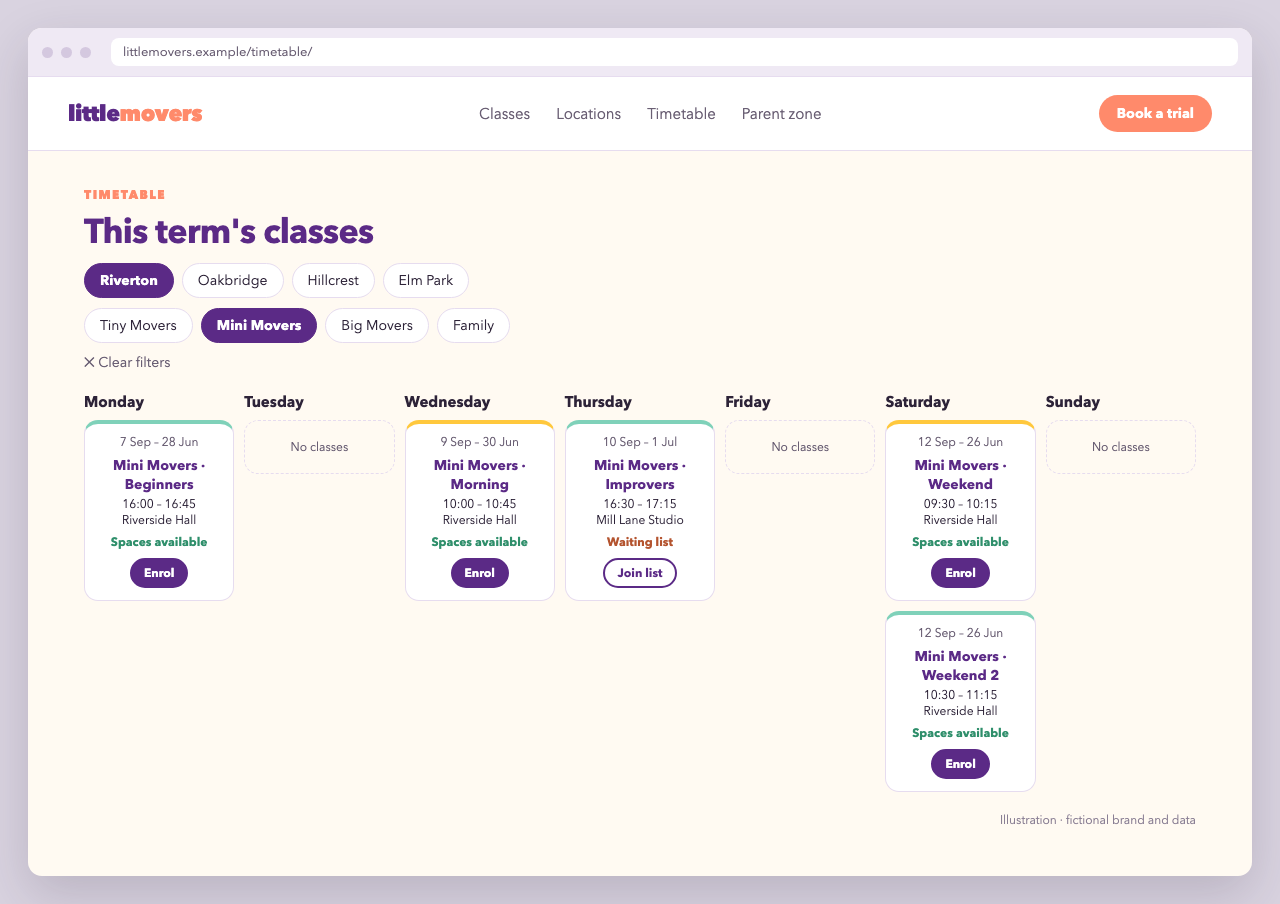
Little Movers' timetable page has filter chips at the top: one row of towns, one of programmes, and a Clear filters link. Below is a seven-column week, Monday to Sunday. Each class card shows the term dates, programme, class name, time, venue and an availability line ("Spaces available" or "Waiting list"), with an Enrol button.
Architecture
Browser ──GET /timetable──▶ Your server ──(cached 10 min)──▶ Zooza REST API
   │                          │                               GET /v1/schedules
   │◀── HTML + JSON ──────────┘                               GET /v1/courses
   │                                                          GET /v1/companies/{id}/places
   └─ Enrol ─▶ /book/?course_id=…&schedule_id=…  (registration widget)
The REST API key and token stay on the server. The page is rendered server-side, so search engines see every class. Filtering happens in the browser.
Step 1: fetch and cache on the server
// timetable.js — Node 18+ (global fetch)
const API = 'https://api.zooza.app/v1';
const HEADERS = {
  'X-ZOOZA-API-KEY': process.env.ZOOZA_API_KEY,
  'X-ZOOZA-TOKEN': process.env.ZOOZA_TOKEN,       // see Authentication
  'X-ZOOZA-COMPANY': process.env.ZOOZA_COMPANY_ID,
};

async function get( path ) {
  const response = await fetch( API + path, { headers: HEADERS } );
  if ( ! response.ok ) throw new Error( `Zooza ${ path }: ${ response.status }` );
  return response.json();
}

// /schedules is paginated: { total, page, page_size, data }
async function get_all_schedules( query ) {
  const all = [];
  for ( let page = 1; ; page++ ) {
    const res = await get( `/schedules?${ query }&page=${ page }&page_size=100` );
    all.push( ...( res.data || [] ) );
    if ( all.length >= ( res.total || 0 ) || ! ( res.data || [] ).length ) return all;
  }
}

let cache = { at: 0, data: null };

async function load_timetable() {
  if ( cache.data && Date.now() - cache.at < 10 * 60 * 1000 ) return cache.data;

  const [ courses, places, schedules ] = await Promise.all( [
    get( '/courses' ),
    get( `/companies/${ process.env.ZOOZA_COMPANY_ID }/places` ),
    get_all_schedules( 'online_registration=true&ended=false' ),
  ] );

  const course_by_id = new Map( courses.map( ( c ) => [ c.id, c ] ) );
  const place_by_id  = new Map( places.map( ( p ) => [ p.id, p ] ) );

  const classes = schedules
    .filter( ( s ) => s.public !== false )
    .map( ( s ) => {
      const course = course_by_id.get( s.course_id ) || {};
      const place  = place_by_id.get( s.place_id ) || {};
      // Weekly classes repeat on the weekday of their first date
      const weekday = new Date( s.start + 'T12:00:00' ).getDay(); // 0 = Sunday
      const free = s.capacity ? s.capacity - ( s.__calc__registered || 0 ) : null;

      return {
        schedule_id: s.id,
        course_id: s.course_id,
        programme: course.name,
        name: s.name,
        weekday,
        starts_at: minutes_to_time( s.time ),
        ends_at: minutes_to_time( s.time + ( s.duration || 0 ) ),
        term: { from: s.start, to: s.end },
        place_id: s.place_id,
        venue: place.name,
        town: place.city,
        status: free === null || free > 0 ? 'available' : 'waitlist',
      };
    } );

  cache = { at: Date.now(), data: classes };
  return classes;
}

function minutes_to_time( minutes ) {
  const h = String( Math.floor( minutes / 60 ) ).padStart( 2, '0' );
  const m = String( minutes % 60 ).padStart( 2, '0' );
  return `${ h }:${ m }`;
}

module.exports = { load_timetable };
Check each field against the schedules, courses and places reference before relying on it. In particular, the venue's name/city keys depend on how your places are set up. time is minutes from midnight, and start/end are the class's date range.
Step 2: render with data attributes for filtering
Render each class server-side with its filter values on the element, using any template engine:
<nav class="lm-filters" aria-label="Filter timetable">
  <div class="lm-chips" data-filter="town">
    <button type="button" data-value="Riverton">Riverton</button>
    <button type="button" data-value="Oakbridge">Oakbridge</button>
  </div>
  <div class="lm-chips" data-filter="programme">
    <button type="button" data-value="Tiny Movers">Tiny Movers</button>
    <button type="button" data-value="Big Movers">Big Movers</button>
  </div>
  <button type="button" class="lm-clear">Clear filters</button>
</nav>

<div class="lm-week">
  <section class="lm-day" data-weekday="1">
    <h2>Monday</h2>
    <article class="lm-class" data-town="Riverton" data-programme="Tiny Movers">
      <p class="lm-class__term">2 Sep 2026 – 30 Jun 2027</p>
      <h3>Tiny Movers · Beginners</h3>
      <p>15:00 – 15:45 · Riverside Community Hall</p>
      <p class="lm-class__status lm-class__status--available">Spaces available</p>
      <a class="lm-button" href="/book/?course_id=101&schedule_id=5501">Enrol</a>
    </article>
    <!-- … -->
  </section>
  <!-- Tuesday … Sunday -->
</div>
Step 3: filter in the browser
<script>
  ( function () {
    var active = { town: null, programme: null };

    function apply() {
      document.querySelectorAll( '.lm-class' ).forEach( function ( card ) {
        var match = Object.keys( active ).every( function ( key ) {
          return ! active[ key ] || card.dataset[ key ] === active[ key ];
        } );
        card.hidden = ! match;
      } );
      document.querySelectorAll( '.lm-day' ).forEach( function ( day ) {
        day.classList.toggle( 'lm-day--empty', ! day.querySelector( '.lm-class:not([hidden])' ) );
      } );
    }

    document.querySelectorAll( '.lm-chips' ).forEach( function ( group ) {
      group.addEventListener( 'click', function ( event ) {
        var chip = event.target.closest( 'button[data-value]' );
        if ( ! chip ) return;
        var key = group.dataset.filter;
        active[ key ] = active[ key ] === chip.dataset.value ? null : chip.dataset.value;
        group.querySelectorAll( 'button' ).forEach( function ( b ) {
          b.setAttribute( 'aria-pressed', String( b.dataset.value === active[ key ] ) );
        } );
        apply();
      } );
    } );

    document.querySelector( '.lm-clear' ).addEventListener( 'click', function () {
      active = { town: null, programme: null };
      document.querySelectorAll( '.lm-chips button' ).forEach( function ( b ) {
        b.setAttribute( 'aria-pressed', 'false' );
      } );
      apply();
    } );
  } )();
</script>
Step 4: the booking page
/book/ holds a normal registration widget. The widget reads course_id and schedule_id from the URL, so the parent lands on the class they clicked:
<div data-zooza-widget="registration" data-zooza-id="YOUR_WIDGET_KEY"></div>
<script async src="https://api.zooza.app/widgets/v1/loader.js"></script>
Why it's built this way
- Server-side fetch keeps credentials private and lets search engines index the full timetable.
- A short cache (10 minutes) keeps the page fast and the API calls low, while availability stays fresh enough. The booking form always re-checks capacity live.
- Filters use data attributes and
hidden, so they work without a framework and keep the page accessible. - Deep links into the widget skip two steps of the booking form.
Variations
- No server at all: the calendar widget shows a live schedule with built-in filters by location, programme, type and instructor.
- Age filter: keep the age range per programme in your CMS (keyed by
course_id) and add it as anotherdata-attribute. - Instructor names: add
load_trainersto the schedules request and render the instructor on the card.