Fully custom course catalogue on the REST API
The problem
A business with dozens of programmes in many towns usually outgrows a single booking form. It wants a catalogue that feels like part of the brand, with illustrations, age bands, SEO-friendly programme pages and filters, and still with live availability and proper booking. Marketing wants to edit the copy. Operations wants to manage classes in one system, not two.
What you'd have to build yourself
- A class and venue database with capacity, waiting lists, terms and instructors, in sync with everything the office does every day.
- Availability that reacts to bookings, cancellations and transfers in real time.
- Booking, payments, installments, make-ups and client accounts behind the "Sign up" button.
With Zooza you build only the presentation layer. Everything behind it stays in Zooza.
Who owns what
| Data | Owner | Why |
|---|---|---|
| Programme copy, illustrations, age band, SEO text | Your CMS | Marketing edits it freely and it doesn't affect operations |
| Programmes, classes, venues, times, instructors | Zooza | Staff manage them daily in Zooza |
| Capacity, bookings, waiting list | Zooza | Must be live and exact |
| Booking, payment, client account | Zooza registration widget | Already handles every rule |
The two are linked by the Zooza course_id, stored as a field on each programme in your CMS.
How it looks
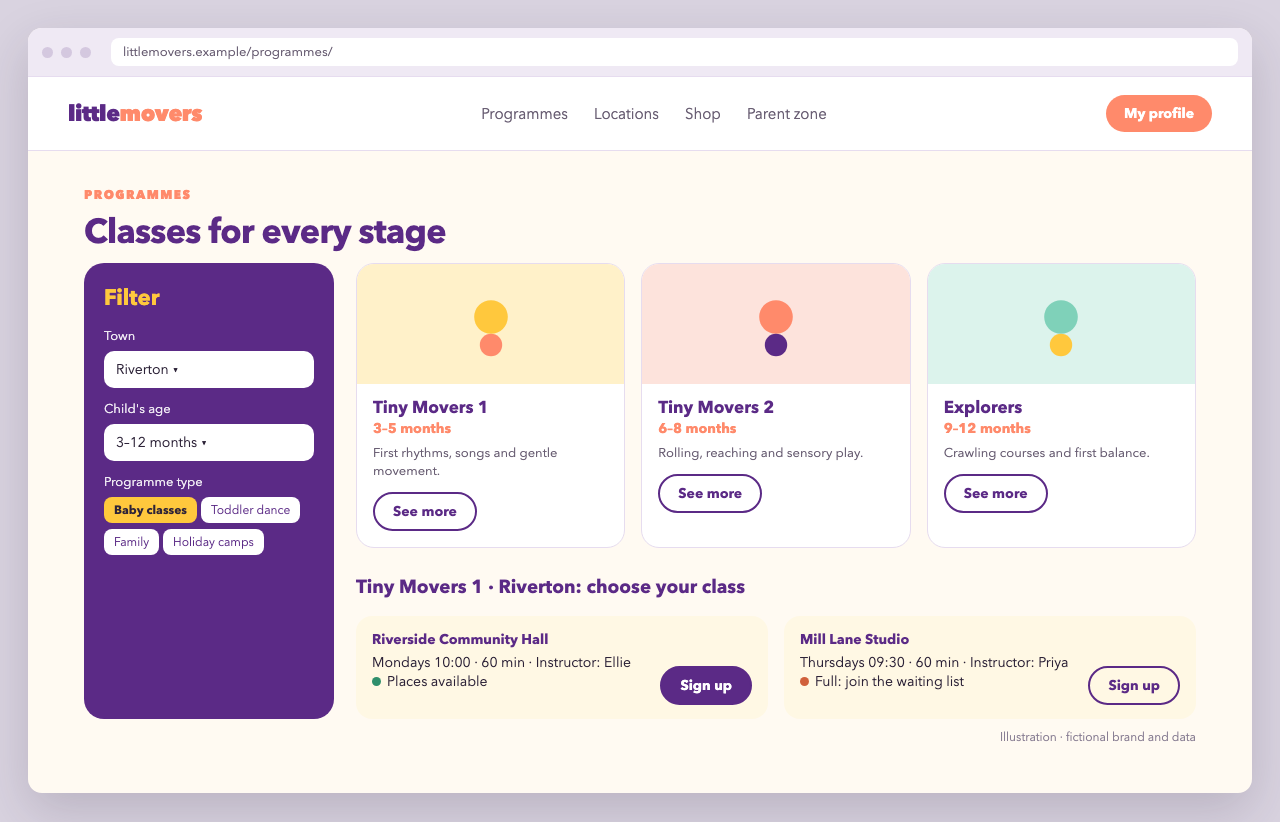
Little Movers' site has three levels:
- Catalogue (
/programmes/): a filter sidebar (town, child's age, programme type) and a grid of illustrated programme cards, for example Tiny Movers 1 (3–5 months) or Explorers (12–18 months). - Programme page (
/programmes/tiny-movers-1/): description, length and group size, plus a "Choose your town" dropdown with search. - Class picker (
/book/tiny-movers-1/riverton/): the classes for that programme in that town, grouped by venue. Each class shows its time, instructor and availability, with Sign up. Full classes say so and offer the waiting list.
Sign up opens the booking page with the registration widget, preselected to that class.
Step 1: the catalogue (CMS only)
The catalogue and programme pages are ordinary CMS pages. Each programme entry has:
{
  "slug": "tiny-movers-1",
  "title": "Tiny Movers 1",
  "age_band": "3–5 months",
  "type": "baby-classes",
  "illustration": "/img/programmes/tiny-movers-1.svg",
  "zooza_course_id": 101
}
Filters for age and type run on CMS data, with no API call. The town filter uses the town list from Step 2.
Step 2: towns and classes from Zooza (server-side)
<?php
// zooza.php — WordPress / plain PHP. Credentials come from wp-config.php or env.

function zooza_get( string $path ): array {
    $cache_key = 'zooza_' . md5( $path );
    $cached = get_transient( $cache_key );
    if ( $cached !== false ) {
        return $cached;
    }

    $response = wp_remote_get( 'https://api.zooza.app/v1' . $path, [
        'headers' => [
            'X-ZOOZA-API-KEY' => ZOOZA_API_KEY,
            'X-ZOOZA-TOKEN'   => zooza_server_token(), // see Authentication
            'X-ZOOZA-COMPANY' => ZOOZA_COMPANY_ID,
        ],
        'timeout' => 10,
    ] );
    if ( is_wp_error( $response ) || wp_remote_retrieve_response_code( $response ) !== 200 ) {
        return [];
    }

    $data = json_decode( wp_remote_retrieve_body( $response ), true ) ?: [];
    set_transient( $cache_key, $data, 10 * MINUTE_IN_SECONDS );
    return $data;
}

/** Classes of one programme that are open for online booking, grouped by venue. */
function little_movers_classes( int $course_id, string $town ): array {
    $places = zooza_get( '/companies/' . ZOOZA_COMPANY_ID . '/places' );
    $schedules = zooza_get( '/schedules?course_id=' . $course_id
        . '&online_registration=true&ended=false&load_trainers=true&page_size=100' );

    $venues = [];
    foreach ( $places as $place ) {
        if ( strcasecmp( $place['city'] ?? '', $town ) === 0 ) {
            $venues[ $place['id'] ] = [ 'place' => $place, 'classes' => [] ];
        }
    }

    foreach ( $schedules['data'] ?? [] as $s ) {
        if ( ! isset( $venues[ $s['place_id'] ] ) ) {
            continue;
        }
        $free = isset( $s['capacity'] ) ? $s['capacity'] - ( $s['__calc__registered'] ?? 0 ) : null;
        $venues[ $s['place_id'] ]['classes'][] = [
            'schedule_id' => $s['id'],
            'name'        => $s['name'],
            'time'        => sprintf( '%02d:%02d', intdiv( $s['time'], 60 ), $s['time'] % 60 ),
            'duration'    => $s['duration'],
            'full'        => $free !== null && $free <= 0,
        ];
    }

    return array_filter( $venues, fn( $v ) => count( $v['classes'] ) > 0 );
}
Verify the field names (city, time, capacity, __calc__registered, …) against the schedules and places reference for your account. time is minutes from midnight.
Step 3: the class picker template
<?php $venues = little_movers_classes( $programme['zooza_course_id'], $town ); ?>

<h1>Choose your class</h1>
<p class="lm-tags"><span><?= esc_html( $town ) ?></span> <span><?= esc_html( $programme['title'] ) ?></span></p>
<p>Class full? Sign up anyway. You'll join the waiting list and we'll contact you as soon as a place opens.</p>

<?php foreach ( $venues as $venue ) : ?>
  <section class="lm-venue">
    <h2><?= esc_html( $venue['place']['name'] ) ?></h2>
    <div class="lm-class-grid">
      <?php foreach ( $venue['classes'] as $class ) : ?>
        <article class="lm-class-card">
          <h3><?= esc_html( $class['name'] ) ?></h3>
          <p><?= esc_html( $class['time'] ) ?> · <?= (int) $class['duration'] ?> min</p>
          <p class="lm-availability <?= $class['full'] ? 'is-full' : 'is-open' ?>">
            <?= $class['full'] ? 'Full: join the waiting list' : 'Places available' ?>
          </p>
          <a class="lm-button" href="<?= esc_url( add_query_arg( [
              'course_id'   => $programme['zooza_course_id'],
              'schedule_id' => $class['schedule_id'],
          ], home_url( '/book/' ) ) ) ?>">Sign up</a>
        </article>
      <?php endforeach; ?>
    </div>
  </section>
<?php endforeach; ?>
Step 4: booking
/book/ contains the registration widget. It picks up course_id and schedule_id from the URL. Whether a full class goes to the waiting list is decided by your programme settings in Zooza, not by the website.
<div data-zooza-widget="registration" data-zooza-id="YOUR_WIDGET_KEY"
     data-zooza-multi-step-form="true"></div>
<script async src="https://api.zooza.app/widgets/v1/loader.js"></script>
Why it's built this way
- Clear ownership: marketing never touches classes, and staff never touch web copy. The only link between them is
course_id. - Server-side reads with a cache keep credentials private, keep pages fast and indexable, and avoid an API call per visitor.
- Booking stays in the widget. Prices, installments, trials, discounts, waiting lists and payment rules are enforced by Zooza, so the website can't sell something the business doesn't offer.
- The availability shown is a hint. The widget re-checks it live at booking time.
Variations
- Town landing pages:
/riverton/lists every programme with classes in that town. That's good for local SEO. - Trial-first funnel: send "Sign up" to a page with
registration_display_mode: 'trials_only'. - Headless front-end: the same pattern works in Next.js, Nuxt or Astro. Fetch on the server, render static pages and revalidate every few minutes.