Contact and lead form designs
The problem
Not every parent is ready to book. Many want to ask first: "Which group is right for my 4-year-old?", "Is there space at the pool near us?". Those questions are leads. They should land in the same system as your bookings, with the source campaign attached, so someone follows up and the enquiry turns into a trial booking.
What you'd have to build yourself
A form backend with validation and spam protection, consent records, campaign attribution (UTM, click ids, the first page the visitor came from), notifications, an owner and a to-do for each enquiry, an automatic reply, and analytics events. The Zooza contact widget handles this, and enquiries arrive as contacts in Zooza. You choose the fields in Settings > Contact forms and the design on your site.
The embed
<div data-zooza-widget="contact" data-zooza-id="YOUR_API_KEY"
     data-zooza-config-id="12"></div>
<script async src="https://api.zooza.app/widgets/v1/loader.js"></script>
config_id picks which form configuration (fields, consents, after-submit behaviour) to show. Leave it out to use the default one. Add every domain the form runs on under Additional domains.
The form is styled with theme variables on .zooza-contact-widget. Every default rule has zero specificity, so your CSS always wins without !important. See the full list of variables and class names.
Variant A: split landing page for trial enquiries
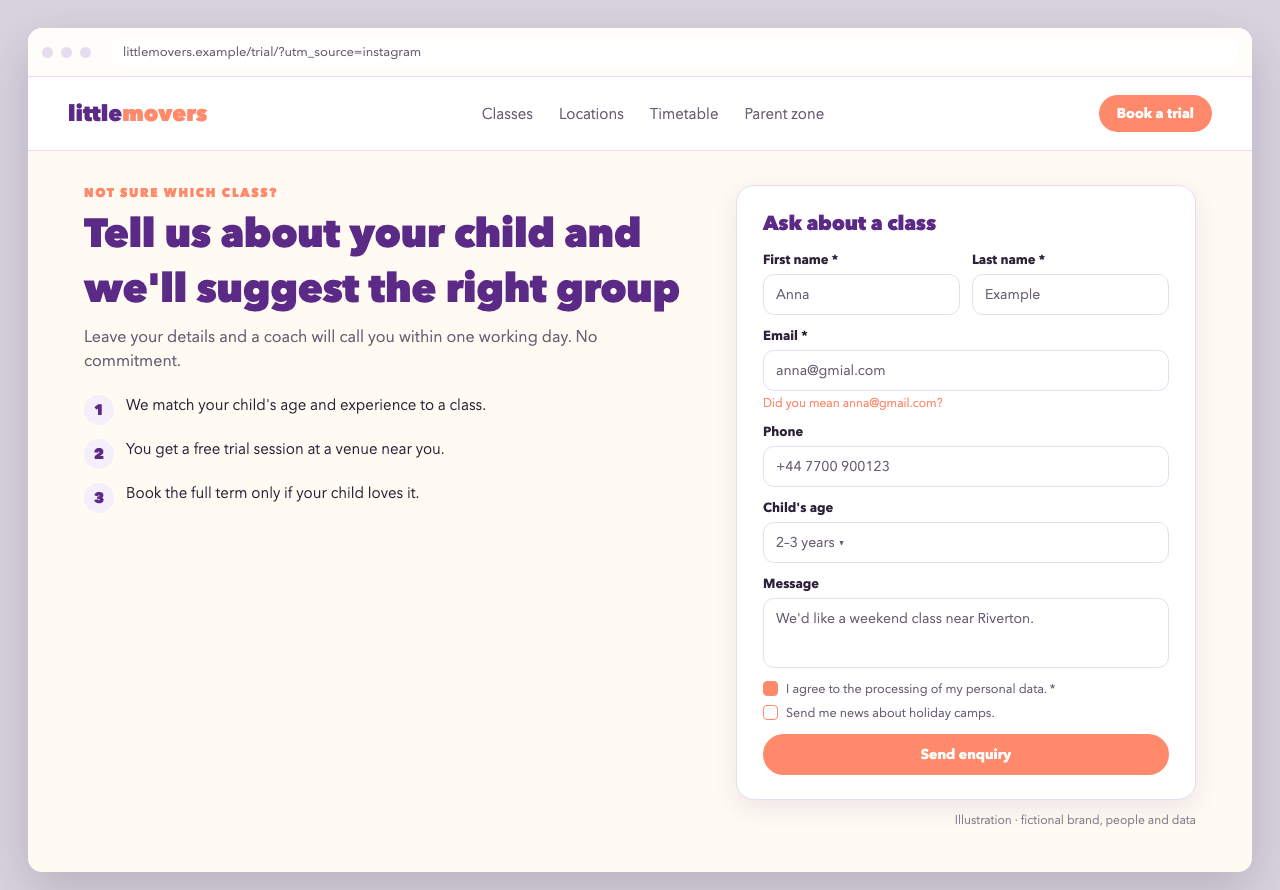
For paid campaigns: the promise and the steps on the left, the form on the right, visible without scrolling. The form asks only what a coach needs to call back, and a custom Child's age drop-down is set up in the form configuration.
<section class="lm-enquiry">
  <div class="lm-enquiry__copy">
    <p class="lm-eyebrow">Not sure which class?</p>
    <h1>Tell us about your child and we'll suggest the right group</h1>
    <ol>
      <li>We match your child's age and experience to a class.</li>
      <li>You get a free trial session at a venue near you.</li>
      <li>Book the full term only if your child loves it.</li>
    </ol>
  </div>
  <div class="lm-enquiry__form">
    <h2>Ask about a class</h2>
    <div data-zooza-widget="contact" data-zooza-id="YOUR_API_KEY" data-zooza-config-id="12"></div>
  </div>
</section>
.lm-enquiry { display: grid; grid-template-columns: 1fr minmax(0, 460px); gap: 3rem; align-items: start; }
@media (max-width: 860px) { .lm-enquiry { grid-template-columns: 1fr; } }
.lm-enquiry__form { background: #fff; border: 1.5px solid #e6dcef; border-radius: 18px; padding: 1.5rem; box-shadow: 0 8px 24px rgba(91, 42, 134, .10); }

.lm-enquiry .zooza-contact-widget {
  --zooza-font-family: inherit;
  --zooza-accent: #ff8a6b;
  --zooza-border-color: #e6dcef;
  --zooza-border-width: 1.5px;
  --zooza-radius: 11px;
  --zooza-control-background: #fff;
  --zooza-control-padding: .65em .8em;
  --zooza-gap: .9em;
  --zooza-max-width: 100%;
  --zooza-error-color: #c2410c;
}
.lm-enquiry .zooza-contact-button__primary {
  width: 100%;
  border-radius: 999px;
  background: #ff8a6b;
  border-color: #ff8a6b;
  color: #fff;
  font-weight: 700;
}
Turn on Remember where the visitor first came from in the configuration if the ad sends visitors to another page first. The UTM parameters are then kept with the enquiry. Do this only with consent from your cookie banner, see Attribution.
Variant B: minimal footer form
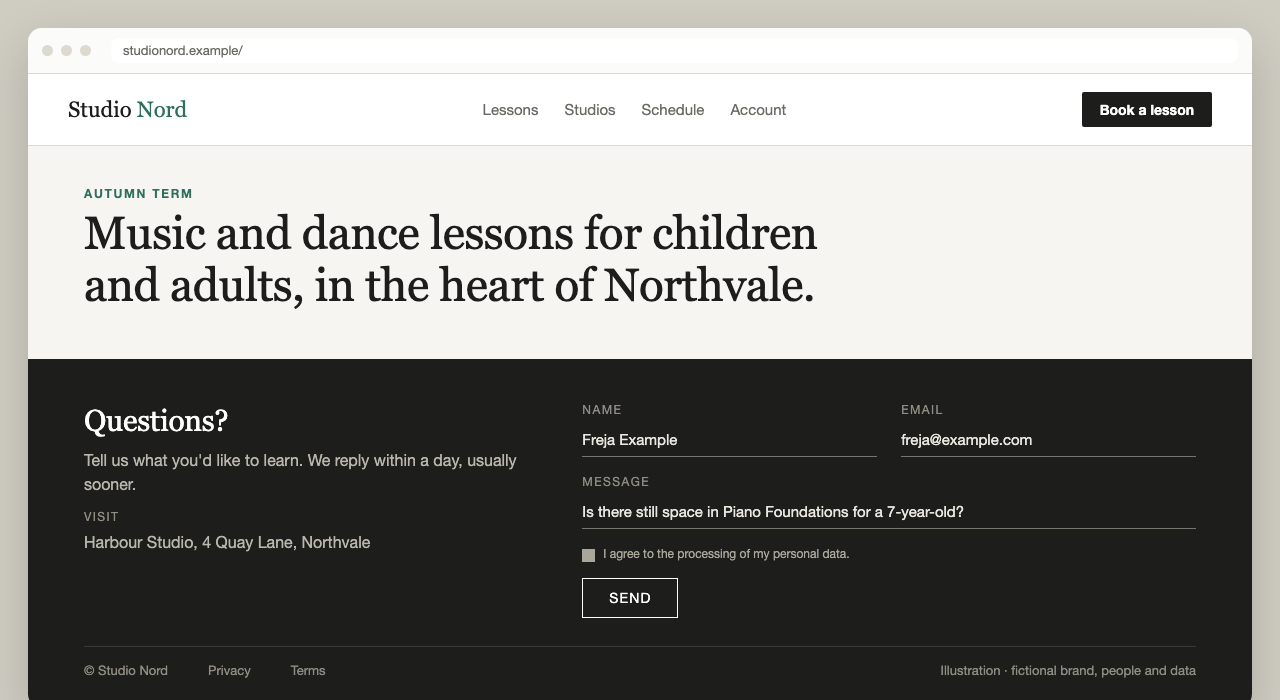
One short form in the footer of every page: name, email and message, nothing else. On a dark background the form inherits the light text colour, and underline-only inputs keep it quiet.
.nord-footer .zooza-contact-widget {
  --zooza-text-color: #e9e7e0;
  --zooza-accent: #ffffff;
  --zooza-border-color: #77756d;
  --zooza-radius: 0;
  --zooza-control-padding: .5em 0;
  --zooza-control-background: transparent;
  --zooza-max-width: 100%;
  --zooza-success-color: #c9b27c;
}
.nord-footer .zooza-contact-input,
.nord-footer .zooza-contact-textarea {
  border-width: 0 0 1px;          /* underline only */
}
.nord-footer .zooza-contact-label {
  font-size: .75rem;
  letter-spacing: .12em;
  text-transform: uppercase;
  color: #8f8c83;
}
.nord-footer .zooza-contact-button__primary {
  background: transparent;
  border: 1px solid #fff;
  color: #fff;
  letter-spacing: .08em;
  text-transform: uppercase;
}
Create a separate, short configuration for the footer (for example config_id 14 with only name, email and message), so footer enquiries are easy to tell apart in reports.
Variant C: one form per venue, with hidden fields
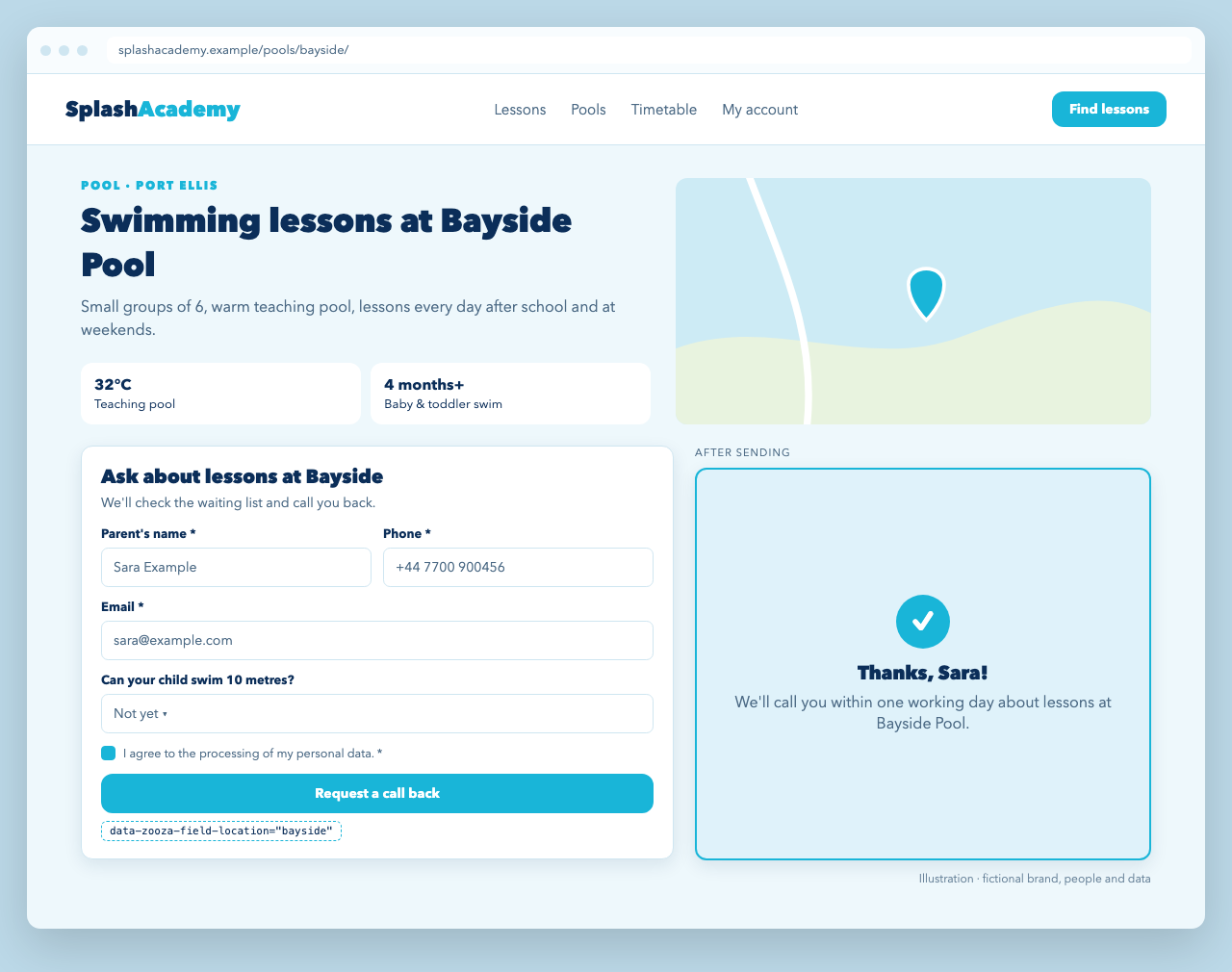
A swim school with many pools wants every enquiry tagged with the pool, without a separate form for each one. One configuration has a hidden field whose value source is the embed code attribute location. Each venue page passes its own value:
<!-- Bayside Pool page -->
<div data-zooza-widget="contact" data-zooza-id="YOUR_API_KEY"
     data-zooza-config-id="21"
     data-zooza-field-location="bayside"></div>

<!-- Harbour Lido page -->
<div data-zooza-widget="contact" data-zooza-id="YOUR_API_KEY"
     data-zooza-config-id="21"
     data-zooza-field-location="harbour-lido"></div>
Style the success state too. The widget root carries data-status="success" after a successful send:
.splash-venue .zooza-contact-widget {
  --zooza-accent: #19b5d8;
  --zooza-border-color: #cfe6f1;
  --zooza-radius: 12px;
  --zooza-control-background: #fff;
  --zooza-max-width: 100%;
}
.splash-venue .zooza-contact-button__primary {
  width: 100%;
  background: #19b5d8;
  border-color: #19b5d8;
  color: #fff;
  font-weight: 800;
}
.splash-venue .zooza-contact-widget[data-status='success'] {
  padding: 2rem;
  border: 2px solid #19b5d8;
  border-radius: 12px;
  background: #dff2fa;
  text-align: center;
}
Write the success text in the configuration ("Thanks! We'll call you within one working day about lessons at Bayside Pool."), or send visitors to a thank-you page.
Track enquiries as conversions
All variants push the same analytics events. Use zooza_event_contact_form_submitted as your lead conversion in Google Tag Manager, GA4 or Meta, and zooza_contact_form_id to compare the landing page, footer and venue forms.
In Google Tag Manager, create a Custom Event trigger named zooza_event_contact_form_submitted and attach your GA4 or Google Ads conversion tag to it. Add a variable for zooza_contact_form_id to break leads down by form. The events never contain the visitor's name, email, phone or message.
The form contains elements that are hidden on purpose for spam protection. Don't add CSS that makes hidden inputs inside the widget visible.